
How Long Does a Cali Clear Take to Charge?
A Cali Clear charges fully in 35 to 45 minutes from empty, over USB-C. The port is on the base of the device, and the 300mAh battery is the same across every current format — 2g, 1g, and Dual Chamber all charge in the same window.
You will know it is finished when the indicator light turns off.


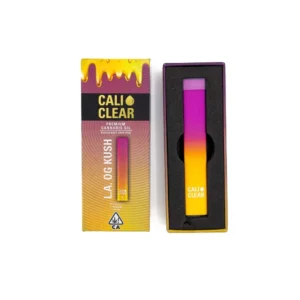

How to Know When Your Cali Clear Is Charged
The indicator light is the only signal the device gives, so it is worth knowing what each state means.
Light behaviour | What it means |
|---|---|
Solid white light | Charging in progress |
Light turns off | Charging complete |
Rapid flashing or no light | Not charging — check the cable and port |
Rapid flash when you draw | Battery is flat, needs charging |
There is no battery percentage display and no app. The light is all there is, which is why the states matter.
How to Charge a Cali Clear
- Find the port. USB-C, centered on the base of the device.
- Use a standard USB-C cable. Any phone or laptop cable works.
- Plug into a low-power source — a computer USB port, a phone wall adapter, or a power bank.
- Watch the indicator. A solid white light will illuminate to confirm it is receiving power.
- Unplug when it signals complete. Around 35 to 45 minutes from empty; less if it was partly charged.
What Charger Should You Use?
Any standard USB-C cable and any normal USB power source. The device draws what it needs and no more, so a phone charger, a laptop port, or a power bank are all fine.
Two things worth avoiding:
- Unbranded high-output fast chargers. A compliant charger negotiates the correct current with the device. A cheap non-compliant one may not, and a 300mAh cell has very little headroom for being pushed. If a charger has no recognisable brand and no certification marking, use something else.
- Charging it unattended overnight. The cell is small, protected, and low-risk, but 35 to 45 minutes is the full charge time — leaving it connected for eight hours achieves nothing and is a habit worth not having with any lithium device.
Can You Overcharge a Cali Clear?
Not in the sense most people mean. The charging circuit stops drawing current once the cell is full, so a device left plugged in for an extra half hour is not accumulating charge or damage.
What does shorten a lithium battery’s life is heat and time spent at full charge. In practice that means: unplug it when the light says it is done, and do not leave it charging on a windowsill or next to anything warm. Neither of those requires vigilance — they just avoid the two things that actually matter.
Can You Use It While Charging?
No. The Cali Clear V6 hardware disables the coil while the charging cable is connected. You cannot draw from the device while it is plugged in.
Even where a device permits pass-through use, drawing while charging generates heat in both the coil and the cell at the same time. A full charge takes under 45 minutes; waiting is the better option.
Charging a Cali Clear After Storage
A device that has sat in a drawer or a multi-pack for months will usually need charging before its first use, and that is normal rather than a fault. Lithium cells self-discharge slowly even when nothing is drawing from them.
If a stored unit will not take a charge at all, it may have discharged too deeply to recover — see the section below. Storing devices upright, cool, and out of direct light slows all of this down; more on that on our bulk and multi-pack page.
My Cali Clear Won’t Charge
Work through these in order before concluding the device is dead.
- Try a different cable. Cable failure is more common than device failure by a wide margin.
- Try a different power source. A USB port that charges a phone slowly may not deliver reliably to a small device.
- Clean the port. Pocket lint compacts into a USB-C socket and prevents the connector seating fully. A dry cocktail stick or a blast of compressed air, gently — never anything metal.
- Check the light responds at all. A completely dead battery may show no light for the first few minutes of charging before the solid white light appears, whereas a device with a charging fault will remain completely dark.
If none of that works, the full fault sequence is on our troubleshooting guide. A device that flashes with no draw at all is a different problem — that is covered on the blinker guide.
Frequently Asked Questions
How long does a Cali Clear take to charge?
35 to 45 minutes from empty, over USB-C. The 300mAh battery is the same across the 2g, 1g, and Dual Chamber formats.
35 to 45 minutes from empty, over USB-C. The 300mAh battery is the same across the 2g, 1g, and Dual Chamber formats.
How long do you charge a Cali Clear for?
Until the indicator signals complete — typically 35 to 45 minutes from flat. There is no benefit to leaving it connected longer, because the circuit stops drawing current once the cell is full.
Until the indicator signals complete — typically 35 to 45 minutes from flat. There is no benefit to leaving it connected longer, because the circuit stops drawing current once the cell is full.
How do I know when my Cali Clear is charged?
The indicator light turns off when the battery is fully charged. There is no percentage display; the indicator light is the only signal.
The indicator light turns off when the battery is fully charged. There is no percentage display; the indicator light is the only signal.
What kind of charger does a Cali Clear use?
USB-C, with the port on the base. Any standard cable and any normal USB power source will do — a phone charger, a laptop port, or a power bank.
USB-C, with the port on the base. Any standard cable and any normal USB power source will do — a phone charger, a laptop port, or a power bank.
Can you overcharge a Cali Clear?
No. The charging circuit stops drawing current when the cell is full. Heat and prolonged time at full charge shorten battery life generally, so unplugging when it signals complete is still the better habit.
No. The charging circuit stops drawing current when the cell is full. Heat and prolonged time at full charge shorten battery life generally, so unplugging when it signals complete is still the better habit.
Can you use a Cali Clear while it’s charging?
No. The device disables the coil while the USB-C cable is connected. You must unplug it before you can draw.
No. The device disables the coil while the USB-C cable is connected. You must unplug it before you can draw.
Why won’t my Cali Clear charge?
Most often a failed cable, an underpowered USB port, or lint compacted in the charging socket. Try a different cable first — cable failure is far more common than device failure.
Most often a failed cable, an underpowered USB port, or lint compacted in the charging socket. Try a different cable first — cable failure is far more common than device failure.
Written by Peter Grinspoon, product review expert and head of review at our authorized retail business. With years of dedicated experience in licensed cannabis retail and hardware evaluation, Peter ensures every product we recommend meets the highest standards of authenticity, safety, and performance.