
How to Use a Cali Clear
There is no button and no on switch. A Cali Clear is draw-activated — you inhale and it works. That is the entire operation, and it is the thing that confuses almost everyone coming from a device with a button.
If you are looking for the power button, there isn’t one. If you are looking for a preheat mode, there isn’t one of those either, and the section below explains what to do instead.
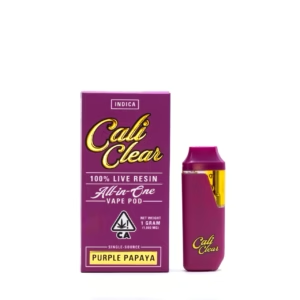

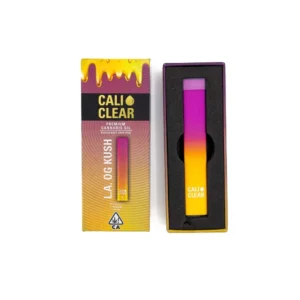

How to Open a Cali Clear
- Break the seal on the outer packaging.
- Slide the device out of its sleeve or tray.
- Remove any protective cap from the mouthpiece, and check for an air-tight plug on the bottom base
- Check the unit before the first draw — seal intact, mouthpiece clear, no oil on the outside. If anything looks wrong, verify it against our authenticity guide before using it.
There is nothing to assemble, nothing to screw together and nothing to fill. The device arrives sealed and ready.
How to Turn On a Cali Clear
You don’t. There is no power button, no click sequence and no standby mode.
Just draw. An airflow sensor inside the device detects the inhale and powers the coil for as long as you keep drawing, up to the 8-second cutoff. When you stop, it powers down on its own.
Two things that trip people up:
- Draw gently. The sensor is tuned for a slow, steady pull. A hard, sharp inhale can fail to trigger it — counterintuitively, pulling harder often produces less vapour, not more.
- Two to three seconds is a normal draw. That is what the device is designed around and what our 800–1,000 puff figure is measured at.
If you draw and nothing happens, the battery is the most likely cause — see the charging guide.
How to Preheat a Cali Clear
You can’t, because there is no preheat function. Preheat modes exist on devices with buttons, where two or five rapid clicks run the coil at low power for a few seconds to thin the oil. A Cali Clear has no button, so it has no way to receive that instruction.
That is not a missing feature so much as a consequence of the design — the device only knows one command, which is “someone is drawing.”
What to do instead when the oil is too thick:
- Warm the device in your hand for one to two minutes. This is the actual fix, and it works. Cold oil is thick oil; hand warmth is enough to move it and is the only heat that should go anywhere near a lithium cell.
- Take a few short, gentle draws to get the oil moving before a full one.
- Store it somewhere room temperature rather than a cold car or a windowsill. Most “needs preheating” complaints are really “was stored somewhere cold.”
Never apply a flame, a lighter or a hair dryer. Advice to do that circulates widely and it is wrong — there is a lithium cell a few millimetres from the tank.
How to Switch Flavors on a Cali Clear Dual Chamber
Flavor switching applies only to the Dual Chamber model, which carries two separate 1g tanks. Standard 2g and 1g devices hold a single flavor and cannot be switched. The Dual Chamber features a physical toggle button on the side of the device that routes the airflow between the two tanks.
- Locate the selector: Find the small toggle button on the side of the device shell.
- Select a chamber: Press the button once to cycle the airflow to Chamber A, and press it again to toggle to Chamber B.
- Blend the flavors: Press the button a third time to open the airflow to both chambers simultaneously, allowing the two vapors to mix on the draw.
- Draw normally. Activation works the exact same way regardless of which chamber is selected.
With the selector open to both chambers, the two vapours combine on the draw into a blended profile — which is the reason most people buy the format.
Getting the Best From It
Four habits that make a device last longer and taste better, none of which take any effort.
Keep draws to 2–3 seconds. Longer pulls overheat the coil and degrade terpenes first, which is what produces a harsh, flat finish before the tank is actually empty.
Pause between draws. A few seconds lets the coil cool. Back-to-back long draws are the fastest way to burn out a device early.
Store it upright, cool and dark. Heat thins oil and is the usual cause of leaking; upright keeps oil away from the airflow sensor.
Charge before storing for a while. Lithium cells sitting flat for months can discharge too deeply to recover.
Frequently Asked Questions
How do you turn on a Cali Clear? You don’t — there is no power button. A Cali Clear is draw-activated: inhale gently and it powers the coil automatically, then shuts off when you stop.
How do you preheat a Cali Clear? There is no preheat function, because preheat modes require a button and a Cali Clear has none. If the oil is thick, warm the device in your hand for a minute or two — that is the correct fix and the only heat that should go near a lithium cell.
How do you open a Cali Clear? Break the outer seal, slide the device out, and remove any protective cap from the mouthpiece. Nothing needs assembling or filling.
How do you change flavors on a Cali Clear? Only the Dual Chamber model supports it — it carries two separate 1g tanks with a selector between them. Standard 2g and 1g devices hold one flavor and cannot be switched.
Why isn’t my Cali Clear working when I draw? Usually a flat battery or a draw that is too hard for the airflow sensor. Charge it, then try a slow two-second pull. Full diagnostics on our troubleshooting guide.
How long should a draw be? Two to three seconds. The device cuts power at 8.0 seconds to protect the coil — see the blinker guide for what that cutoff does and why.